CRA’s Digital-First Tax Filing: No More Paper Tax Packages in 2026
What Canadian Taxpayers Need to Know About the CRA’s Shift to Online Filing
The Canada Revenue Agency (CRA) has made a major change for the 2026 tax season. The CRA will no longer mail paper tax packages to Canadians. This shift affects millions of taxpayers who file on paper each year.
This guide explains what changed, who is affected, and how you can prepare.
What Changed for the 2026 Tax Season?
The CRA announced in December 2025 that it will stop automatic mailing of income tax packages. Paper filers will not receive the 2025 income tax package in their mailbox.
Key Facts:
- The CRA filed 93% of returns online in 2025
- Only 7% of Canadians filed paper returns in 2024
- Paper packages are now available only on request
- Digital filing produces refunds in 8 to 10 business days
This decision supports the CRA’s push toward digital services. Electronic returns process faster, reduce errors, and speed up refunds.
Important 2026 Tax Filing Dates
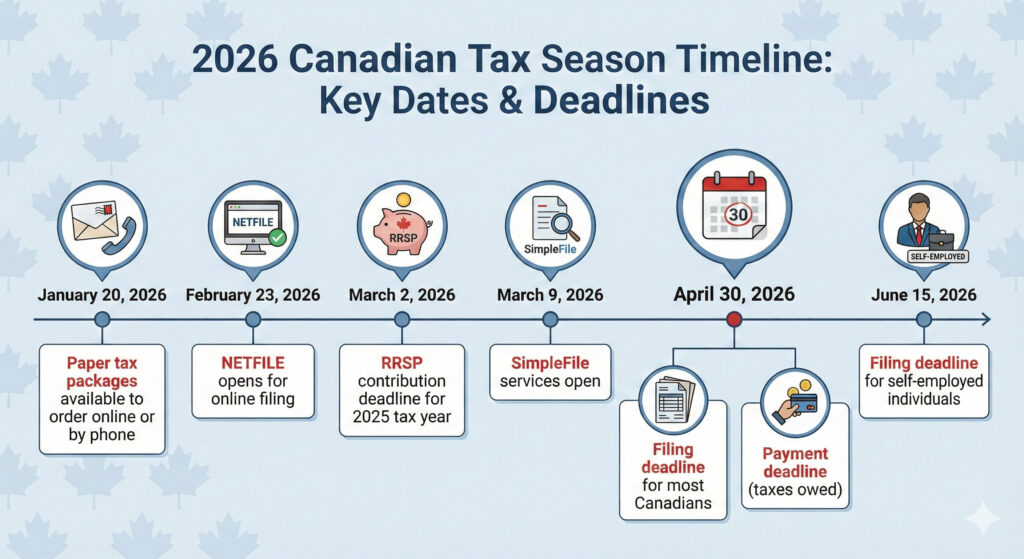
Note: Self-employed Canadians must still pay any taxes owed by April 30, 2026. Interest applies to unpaid balances after this date.
How to Get Paper Tax Forms in 2026
If you prefer to file on paper, you have three options:
Option 1: Download and Print
Visit the CRA Forms and Publications page at canada.ca after January 20, 2026. You can view, download, and print the income tax package for free.
Option 2: Order by Phone
Call the CRA automated line at 1-855-330-3305. Non-residents can call 1-613-940-8495. You will need your Social Insurance Number (SIN) to place the order.
Option 3: Order Online
Request paper forms through the CRA website. Forms arrive by mail within 10 business days.
Important: Do not request forms before January 20, 2026. Earlier requests will send you the 2024 package instead of the 2025 package.
Schedules Removed from Paper Packages
The CRA removed several federal schedules from the standard paper package. These forms had low usage among paper filers.
Removed Schedules:
- Schedule 3: Capital Gains and Losses
- Schedule 6: Canada Workers Benefit
- Schedule 9: Donations and Gifts
- Schedule 12: Multigenerational Home Renovation Tax Credit
You can still download these schedules from the CRA website or request them by phone. Provincial schedules related to these forms also require separate requests.
New CRA My Account Security Requirements
Starting February 2026, the CRA requires all My Account users to have a backup multi-factor authentication (MFA) option on file.
What This Means
When you sign in to your CRA account, you must add a backup MFA option before you can access your account. This prevents lockouts if you lose access to your primary MFA method.
Backup MFA Options
- Passcode grid (paper-based code sheet)
- Third-party authenticator app (Google Authenticator, Microsoft Authenticator)
Note: Telephone is not available as a backup option. You can still use phone as your primary MFA method.
How to Set Up Backup MFA
- Sign in to your CRA account
- Select “Security settings” on the Welcome page
- Select “Multi-factor authentication”
- Follow the steps to add a passcode grid or authenticator app
Set up your backup MFA now to avoid delays during tax season.
Digital Filing Options for Canadians
The CRA offers several ways to file your taxes online.
NETFILE with Certified Tax Software
NETFILE lets you send your tax return directly to the CRA through certified tax software. This is the most common filing method.
Benefits:
- Refunds in 8 to 10 business days with direct deposit
- Instant confirmation of receipt
- Access to Auto-fill My Return feature
- Fewer errors than paper filing
Popular Certified Software:
- TurboTax
- Wealthsimple Tax (free)
- UFile
- H&R Block
- GenuTax (free)
The CRA certifies tax software each year. Check canada.ca for the current list of certified products.
Auto-fill My Return
Auto-fill My Return imports your tax slips directly into your tax software. The CRA has this information from employers, banks, and other sources.
What Auto-fill Imports:
- T4 slips (employment income)
- T5 slips (investment income)
- T4A slips (pension and other income)
- RRSP contribution limits
- Home Buyers’ Plan repayment amounts
- Lifelong Learning Plan balances
Requirements:
- CRA My Account access
- CRA user ID and password (not provincial partner login)
- Certified tax software with Auto-fill support
The CRA receives most tax slips by mid-March each year.
SimpleFile Services
SimpleFile is a free service for Canadians with lower income and simple tax situations. The CRA invites eligible taxpayers to use this service.
SimpleFile Options:
- SimpleFile Digital: File online through CRA My Account
- SimpleFile by Phone: Answer questions over the phone
- SimpleFile by Paper: Simplified paper form (by invitation)
Eligibility:
- Lower income (threshold varies by province, age, and disability status)
- Simple tax situation (limited income sources)
- Invitation from the CRA
SimpleFile opens March 9, 2026. Check your CRA account or mail in early March for your invitation.
Free Tax Clinics
The Community Volunteer Income Tax Program (CVITP) offers free tax preparation for eligible Canadians.
Who Qualifies:
- Modest income
- Simple tax situation
- Seniors, students, newcomers, and people on social assistance
Volunteer clinics operate in person and online across Canada. Visit canada.ca/taxes-help to find a clinic near you.
Pre-filled Tax Returns: Coming in 2026
The federal government announced plans to introduce automatic tax filing starting in 2026. Budget 2025 allocated $71 million over five years for this program.
What This Means:
- Pre-filled tax returns will appear in CRA My Account
- Approximately 1 million lower-income Canadians will qualify initially
- The program will expand to 5.5 million individuals by 2028
Pre-filled returns use information the CRA already has. Eligible individuals can review, modify, or accept the pre-filled return.
Benefits of Filing Online
Digital filing offers clear advantages over paper returns.
| Feature | Online Filing | Paper Filing |
| Refund time | 8-10 business days | 6-8 weeks |
| Confirmation | Instant | None until NOA |
| Error checking | Automatic | Manual review |
| Auto-fill | Available | Not available |
| Cost | Free options exist | Stamps and envelopes |

Who Is Most Affected by This Change?
The end of automatic paper mailings affects certain groups more than others.
Most Affected:
- Seniors who prefer paper filing
- Canadians without reliable internet access
- First-time filers unfamiliar with online tools
- Rural residents with limited connectivity
- People who rely on mailed reminders to file
Support Available:
- Free tax clinics with CVITP volunteers
- SimpleFile services for eligible lower-income Canadians
- Paper forms still available on request
- CRA phone support for assistance
New CRA Online Services for 2026
The CRA added several features to help Canadians manage their taxes online.
Manage Balance
If you owe $1,000 or more in personal tax debt, you can set up a payment plan online. No phone call required.
Features:
- Make full or partial payments
- Schedule automatic payments
- Request a callback if you prefer to speak with someone
NETFILE Access Code
Your 8-character NETFILE access code is now easier to find. Sign in to CRA My Account, go to “Tax returns,” and view your code.
GenAI Chatbot (Beta)
The CRA launched a chatbot on canada.ca. This tool answers common questions about CRA programs and services 24 hours a day.
Self-Service Credential Reset
If you are locked out of your CRA account, you can reset your credentials online. No phone call required.
Steps to Prepare for the 2026 Tax Season
Follow this checklist to file your taxes without delays.
Before Tax Season
- Confirm access to your CRA My Account
- Add backup MFA option (required February 2026)
- Update your address if you moved
- Update your marital status if it changed
- Set up or confirm direct deposit
Gather Your Documents
- T4 slips from employers
- T5 slips from banks and investments
- T4A slips for pensions and benefits
- RRSP contribution receipts
- Charitable donation receipts
- Medical expense receipts
- Childcare expense receipts
- Tuition receipts (T2202)
- Previous year’s Notice of Assessment
Choose Your Filing Method
- Select certified tax software
- Or book a free tax clinic appointment
- Or check SimpleFile eligibility in early March
Common Questions About CRA Digital Filing
Can I still file on paper?
Yes. Paper filing remains available. You must request forms online or by phone starting January 20, 2026. The CRA will not mail them automatically.
How long does it take to get paper forms?
Allow up to 10 business days for mailed forms. Order early to avoid delays near the April 30 deadline.
What if I cannot use a computer?
You can call 1-855-330-3305 to order paper forms. Free tax clinics can also help you file. SimpleFile by Phone lets you file over the phone if you qualify.
Will I still get a Notice of Assessment by mail?
Starting February 2026, Notices of Assessment are digital only. You must view them in CRA My Account. Paper mailing of NOAs is ending.
What happens if I miss the April 30 deadline?
Late filing with a balance owing triggers a penalty of 5% of the amount owed plus 1% for each month late (up to 12 months). Interest compounds daily on unpaid balances.
Is online filing safe?
Yes. The CRA uses multi-factor authentication, encryption, and security monitoring. Online filing is more secure than mailing paper forms with your SIN.
Why the CRA Made This Change
The CRA cited three reasons for ending automatic paper mailings:
- Processing Speed: Electronic returns process in days. Paper returns take weeks.
- Error Reduction: Tax software catches mistakes. Paper returns require manual review.
- Cost Savings: Digital services cost less than printing and mailing millions of packages.
The CRA received over 32 million calls in 2025, with peaks of 300,000 calls per day during tax season. Online self-service tools reduce wait times and free up agents for complex issues.
Need Help Filing Your Taxes?
UBM Tax Associates in Ottawa helps individuals and businesses file their taxes accurately and on time. Our CPA-certified accountants handle T1 personal returns, T2 corporate returns, and GST/HST filings.
We Can Help You:
- Set up your CRA My Account
- Navigate the new digital filing requirements
- Maximize your deductions and credits
- Meet all CRA deadlines
Contact UBM Tax Associates:
📍 170 Harbour View Street, Ottawa, ON K2G 7B4
📞 (613) 843-0757
✉️ [email protected]
Schedule your consultation today. Let our team handle your tax filing while you focus on what matters most.
Summary
The CRA’s digital-first approach changes how Canadians file taxes in 2026. Paper packages no longer arrive automatically. New security requirements apply to CRA My Account users. Online filing offers faster refunds and fewer errors.
Key Takeaways:
- Paper forms available on request starting January 20, 2026
- NETFILE opens February 23, 2026
- Backup MFA required for CRA My Account in February 2026
- April 30, 2026 is the filing and payment deadline for most Canadians
- Free options exist: SimpleFile, free tax software, and CVITP clinics
Prepare now to avoid delays during tax season.